What is Mastodon

So, you got banned from twitter for saying "cis". Aside from this perhaps being the best possible outcome for your mental health, it did also get you thinking about this "Mastodon" thing your linux-loving computer nerd friend won't shut up about. How does it work? Is it worth joining? Is everyone on it also linux-loving computer nerds like your friend?
Recently a couple friends of mine were discussing Mastodon, and expressing some confusion about how it works. As their resident linux-loving computer nerd, here I am to info-dump about it!
"I ain't reading all that"
You can skip to How does it work?, but I recommend you read this whole article. There is a particular mindset that is worthwhile to have when approaching Mastodon, and without it, you may end up having a lot of the same confusion I had when I originally joined Mastodon.
Why I originally quit mastodon
When I originally joined Mastodon, it was the week Elon Musk purchased Twitter. I had previously been on Twitter for work reasons - posting clips from the videogame I was working on, and connecting with other developers. Myself and many of the developers I followed suspected that Twitter would become even worse and more bot-infested than it already was. Bluesky was still invite-only, so I joined Mastodon.
I was immediately very confused. You see, unlike Twitter, which only has twitter.com as its website, Mastodon has many, many websites. I had initially signed up for one of these websites - called tech.lgbt - but upon downloading a mastodon app, I was prompted to sign up for a different Mastodon website called mastodon.social. Because of this, I ended up making two different Mastodon accounts, and didn't know why I had to sign up twice (In fact, I did not need to sign up twice - I just had to wait for tech.lgbt's moderators to approve my application).
None of this was my fault - it is a product of Mastodon's greatest weakness, but also its strength. Mastodon is structured in a fundamentally different way from other social media. This different structure makes it safer, more resilient against censorship, and better moderated. But it comes at the cost of being rather daunting to get a grasp on if you are coming from the world of corporate social media.
Eventually, I put together what had happened - but it had been several months. It took me quite a long time of opening Mastodon, getting bored because there was no algorithm feeding me the stuff I was used to, and then switching back to Instagram or Tumblr.
However, Instagram and Tumblr continued to steadily enshittify themselves, prompting me to periodically re-open Mastodon and try again at getting into a groove with it. Eventually, I reached a point where I was happy with my feed, and had a lot of neat new stuff showing up often. Turns out - Mastodon is really cool! But it works more like a garden than a steady stream of junk food.
How you can avoid my confusion
I am going on this tangent this because I think a lot of people approach Mastodon in the same way I originally did - expecting it to be as easy and smooth as any corporate social media they are familiar with. I worry that, like me, when they discover that it is not, they will lose interest. In this section, I am trying to get you to shift your mindset away from corporate convenience and towards community.
Because Mastodon has so many websites instead of just one, it can be daunting to join - "Why cant I just go to mastodon.com and join, just like Twitter? Why are there so many different websites? What website do I use? Is this website better than this other one? How can I tell?". If you want to join and actually stay on it, I would recommend you try to re-evaluate what you're looking for. If you're reading this article, it's probably because you have realized that corporate social media is bad for you. It's bad for you mental health, it sucks up hours of your day providing nothing in return, it serves you predatory ads, it spies on you... the list could go on.
Eventually, I came to realize that corporate social media had gotten me used to the convenience and expectation that human connection should be commodified and fed up to me with algorithms. It took me a while to detox my brain from this, and get used to the slower pace of Mastodon.
When I left Twitter, I thought I hated the algorithm. But after the first few weeks on Mastodon, I found myself missing it. Mastodon did not give me the instant gratification of learning what I like by spying on me and serving it up. I actually had to learn what I like, and then go looking for it.
What I had to internalize was:
Twitter is about the things you hate. Mastodon is about the things you love.
How does it work?
Twitter has one website - twitter.com. Everyone who uses Twitter also uses twitter.com. Mastodon does not have one website. In fact, Mastodon has so many websites that it's actually hard to know how many truly exist.
A lot of people use Email as a touchstone when describing federated platforms. No matter what email provider you sign up for - Gmail, Yahoo, Proton, Hotmail - you can talk to people who signed up for any other one. amber@gmail.com can talk to john@hotmail.com.
Mastodon works the same way! Amberrrrrrr@tech.lgbt can talk to someotherperson@mastodon.social.
This cross-website connection is called "Federation". To keep things simple up till now, I have been pretending that Mastodon is the only thing that works like this, but that's not true! There are a whole host of platforms that use federation!
- Mastodon is a Twitter-like micro-blogging platform.
- Wafrn is more Tumblr-inspired.
- Pixelfed is a lot like Instagram!
- Lemmy is a Reddit-like link aggregator with a similar upvote/downvote system.
- There are many, many, many more.
No matter which of these you join, you can interact with people on any other one.
How to Join
Step 1: Choose your new digital home <3
Mastodon is all about choice. First, you need to choose a place to sign up! Explore these options listed below, choose one you like the vibe of, and register! Don't stress this too much - you can always move your account later, and no matter which one you choose, you will be able to interact with people from any other server! That's the power of federation!
Because of the confusion I discussed above where an app chose a website for me, I recommend doing this part in a web browser.
Some of these may require you to write a little message about why you want to join. This is a good thing! Servers that require this will have basically zero bots, and pretty chill people. Think of it like a captcha that doesn't suck. Don't stress it - just say how you heard about them, tell them a little bit about yourself, and wait. You'll get an email approving you after the admins have a chance to look at it, usually a couple days later. Remember - you're here to make connections with other people! The admins of your server are a great place to start.
Here are some potential Mastodon websites you can register on! I haven't looked thoroughly at all of these; this is just a few links to get you started looking at options.
General-Purpose
- Seems like a pretty chill general-purpose server.
Special Interests
- Vtuber server!
- Furry server!
Art Servers
- General-purpose art server.
Queer Servers
https://mastodon.catgirl.cloud/about
- Pretty cool general-purpose queer server
- My current home server. Aimed at queer computer nerds.
If none of these meet your fancy, you can browse more here!
Step 2: Let's Get Mobile
Once you have chosen a website, signed up (and been approved if applicable), you can choose an app! I will continue to repeat - Mastodon is all about choice. Just like there is more than one Mastodon website, there is also more than one Mastodon app.
I personally use Moshidon. This is the one that all proceeding images will use.
Lots of people also like Tusky.
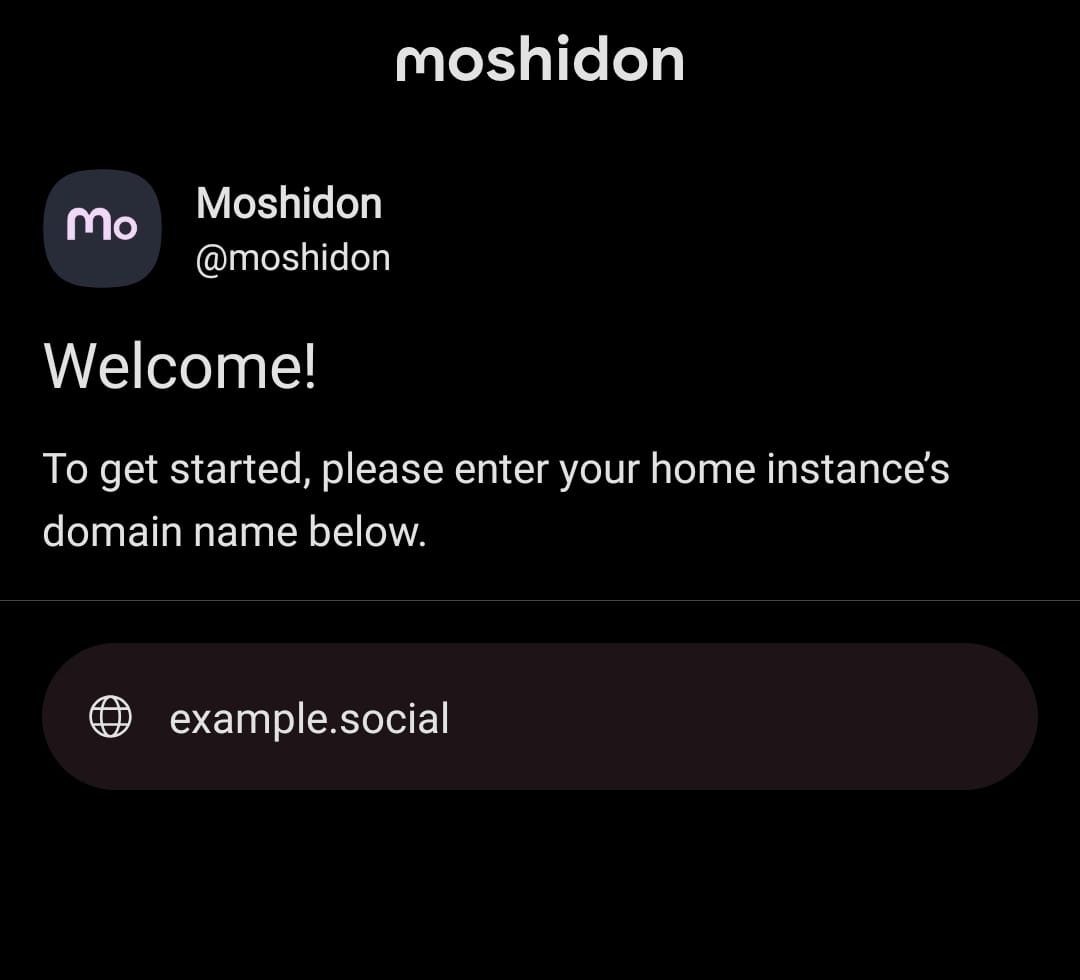
Once you download and install your app of choice, you will be prompted with something like below - "Choose your instance's domain name." This is the website you chose above! So if you chose ohai.social, put ohai.social here!
I'm going to put tech.lgbt here, since that's the website I made my account on:
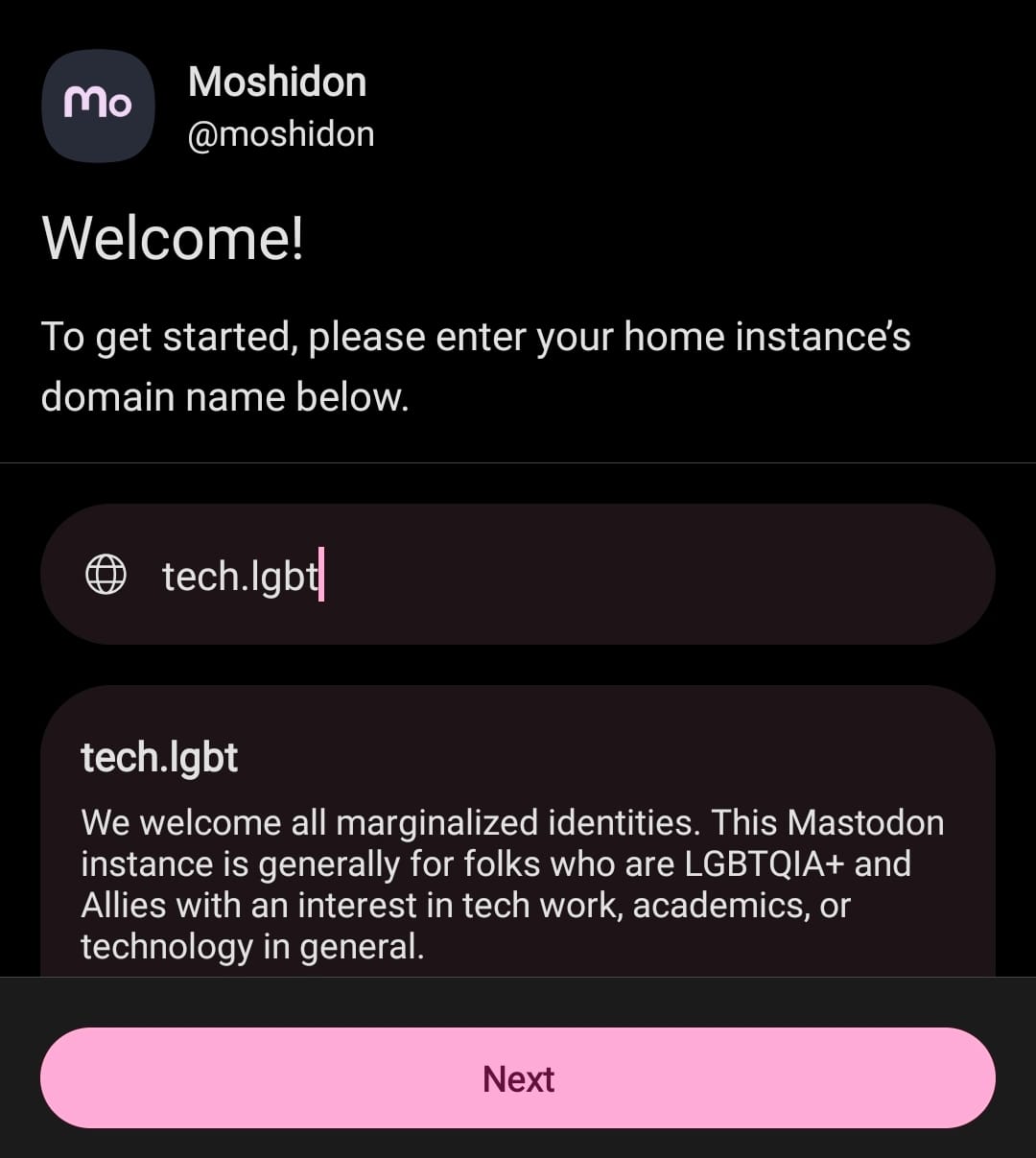
Hit "Next", and from here on out it should be just like any other app sign-in! In my case, I was already signed in on my phone's web browser so all I had to do was "authorize" it. But you will probably need to enter the username and password you created when you registered on your web browser during step 1.
Step 3: Know thyself
Time to find cool people to follow! This is a long game, and it's what can ultimately make or break you time on Mastodon.
You will notice you have three different timelines:
Home, Local, and Federated.
Home is where people you follow will show up. Local is the feed of everyone on the same website as you, and Federated is the combined feed of other Mastodon websites your website's admins have allowed to be visible from their website. If that last one is confusing to you, think of it like this:
Home is like hanging with your friends - you all probably get along and share similar interests. Local is like going to your friend's house party - you may not know everyone there, but they're probably chill. Federated is like going to the club your friend likes - there may be lots of cool people there, but it's ultimately open to the public. Proceed with caution.
Start by browsing your Local feed and following people posting stuff you like. Avoid sensational drama posters. Mastodon is all about discovering friends, friends of friends, and friends of friends of friends.
Some starter follows
One quirk of federation is searching a person doesn't always show you everyone with a given name. In order to follow the accounts below, copy the links and paste them into your app's search box! They should appear and be follow-able this way.
- https://social.growyourown.services/@FediTips
- This account posts helpful Mastodon tips
- https://social.growyourown.services/@FediFollows
- This account links to other accounts you may want to follow.
- https://tech.lgbt/@Amberrrrrrr
- Me <3
- https://mastodon.gamedev.place/@glassbottommeg
- Cool game developer; creator of SkateBIRD
- https://hell.twtr.plus/@Trail_Cams
- Bot that posts trailcam photos
- https://mastodon.social/@mogwai_poet
- Creator of the masterful Frog Fractions
- https://namtao.com/@noboilerplate
- You may recognize him from YouTube. Makes fast, technical videos
- https://mas.to/@TechConnectify
- As seen on youtube
- https://social.notjustbikes.com/@notjustbikes
- As seen on youtube
Step 4: When in Rome...
Mastodon has a strong culture of applying content warnings generously to applicable items, and adding alt-text to images. It's common courtesy to mark political items with an applicable content warning like "uspol" (US politics) / "depol" (German politics), etc.
When adding an image, your app should prompt you to add alt text! This is useful for people who rely upon screen readers, who would otherwise simply hear "image".
Conclusion
That's about it! Have fun, post about the stuff you love, share your art, and do so free of corporate interest <3
See you on fedi!
P.S.